How to set a live wallpaper on the AYN Thor and Anbernic RG DS
Last updated: August 2026
Yes — live wallpapers work on dual-screen handhelds like the AYN Thor and the Anbernic RG DS. Not just the bottom screen either: they run on both, and each screen can have a different one.

Why bother on a handheld like this
The top screen is the reason you bought a two-screen device, and most of the time it’s sitting there doing nothing. A live wallpaper gives it something to do — and on a machine built to look like a DS, that’s half the appeal.
It also looks far better than it has any right to on a small screen. Motion reads well at that size.
Setting one up
Four taps, and you don’t need an account for any of it.
- Install Wallpaper Reactor. It’s a free download, and it runs on Android 9 and up, which every one of these handhelds clears comfortably.
- Open Browse in the bottom bar and scroll the library.
- Tap a wallpaper, then Download it. The button only becomes Set once the file is on the device.
- Tap Set.
If you want it spelled out with screenshots, the Android walkthrough covers the same four steps in more detail.
A different wallpaper on each screen
Out of the box, both screens get the same wallpaper — that’s what the clip above is doing. Giving them different ones takes one setting.
- Open Settings from the bottom bar.
- Scroll down to Multi-Monitor Mode.
- Change it from Duplicate to Custom.
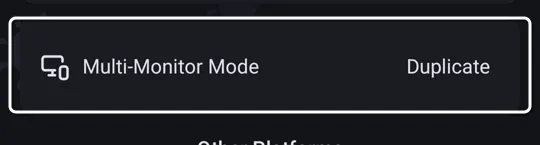
That’s the only change. From now on, tapping Set on a wallpaper asks which screen you want it on instead of putting it on both.
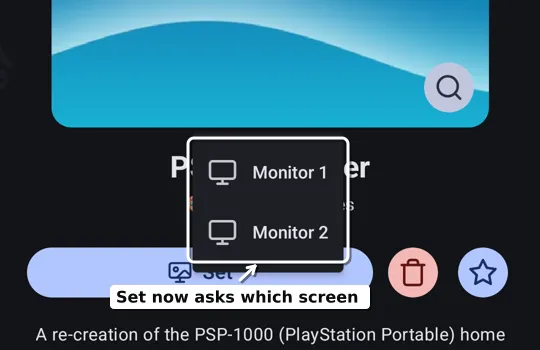
Choose Monitor 1 for one wallpaper, then go back, pick another, and choose Monitor 2. A calm one up top and something busier below. A clock on one and artwork on the other. Whatever suits each screen.
Keeping it easy on the battery
These are handhelds, so it’s worth a thought. Wallpapers pause when the device drops into battery saver, and there’s a separate switch for whether they run on battery at all.
If you want to spend even less, performance modes cap the frame rate and the resolution a wallpaper renders at — the same trick that makes this work nicely on older or cheaper Android hardware.
Worth a try
It’s free, it takes about a minute, and if you don’t like it you set a normal wallpaper back. For a device with a screen that usually sits idle, it’s the cheapest upgrade available.
Can you change the wallpaper on the AYN Thor and Anbernic RG DS?▾
Yes. Both run Android, so you can set any wallpaper you like, including live wallpapers — and they work on both screens.
Does the live wallpaper work on the top screen too?▾
Yes. Both screens can run a live wallpaper, and you can set a different one on each by switching Multi-Monitor Mode to Custom in Settings.
Will a live wallpaper hurt battery life on a handheld?▾
It uses some power, but wallpapers pause when the device enters battery saver, and performance modes let you lower the frame rate and resolution to spend less.
Do I need an account to set one?▾
No. Browsing the library, downloading a wallpaper and setting it all work without signing in.
Free on Android 9 and up, with hundreds of wallpapers and no account needed.
 Download Wallpaper Reactor