How to set a live wallpaper on Android
Last updated: August 2026
Good news: unlike Windows and macOS, Android has supported live wallpapers since 2010. It’s built into the system. What you need is an app that gives you good ones and a sane way to set them.
Here’s the whole thing, in four taps.
1. Install Wallpaper Reactor
It’s a free download on the Play Store, and it runs on Android 9 and up — so a phone from 2018 is still fine. No account needed for any of this.
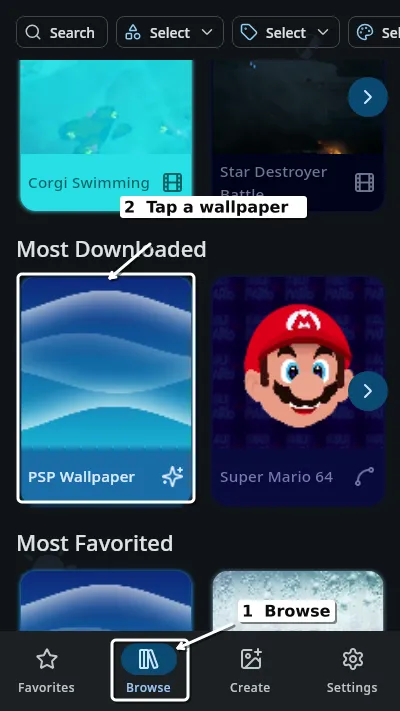
2. Open Browse and tap a wallpaper
Browse is in the bottom bar. The library is grouped into Recently Added, Hidden Gems, Most Downloaded and Most Favorited — scroll until something appeals, then tap it.
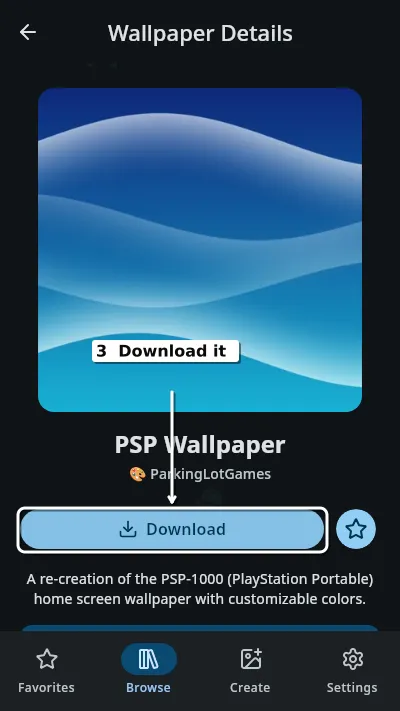
3. Download it
Tapping a wallpaper opens its own screen: a big preview, who made it, and a Download button. Tap that first — until the file is on your phone there’s nothing to set.
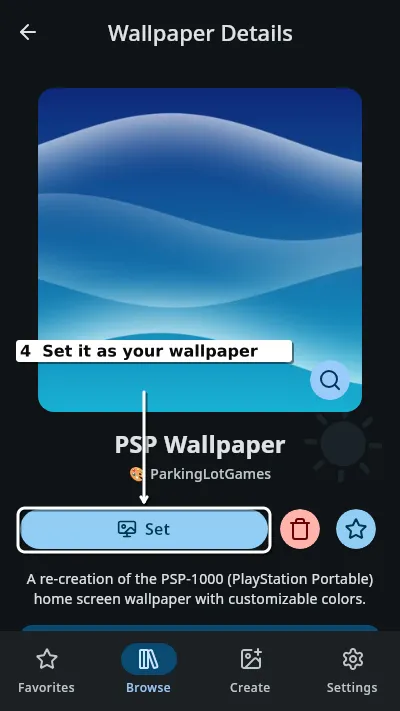
4. Set it
Once downloaded, that button becomes Set. Tap it and it’s your wallpaper.
Worth knowing
Battery is handled for you. Wallpapers pause when your phone switches into battery saver, and there’s a separate control for whether they run on battery at all.
Older phone? Performance modes let you cap the frame rate and the resolution a wallpaper renders at, which makes a real difference on hardware that’s a few years old — that’s covered properly in live wallpapers on an old or cheap Android phone.
On a computer too. The same library and the same four steps work on Windows 11 and on a Mac.
Plugging into a monitor? Desktop Mode is the one place this doesn’t work yet, and that’s Android’s doing rather than the app’s.
Want your own video instead?
A clip you already have — MP4, WebM, even a GIF — takes about fifteen seconds to set, with no account and no conversion: how to set any video as a live wallpaper.
Does Android support live wallpapers natively?▾
Yes. Android has had built-in live wallpaper support since 2010. You install an app that provides them, then set one the same way you would any wallpaper.
How old can my phone be?▾
Wallpaper Reactor runs on Android 9 and up, which covers phones from 2018 onwards.
Do live wallpapers drain your battery?▾
They use some power, but wallpapers pause when your phone enters battery saver, and performance modes let you lower the frame rate and resolution to spend less.
Do I need an account?▾
No. Browsing, downloading and setting wallpapers all work signed out. An account is only for creating wallpapers and syncing them across devices.
Free on Android 9 and up, and the same library works on Windows and macOS too.
 Download Wallpaper Reactor