Live wallpapers on an old or cheap Android phone
Last updated: August 2026
Live wallpapers have a reputation for being something only new phones can afford to run. That reputation is mostly out of date, and it goes back further than people expect: Wallpaper Reactor installs on Android 9, which shipped in 2018. If your phone still gets apps from the Play Store, it can almost certainly run this.
Why older phones struggle
It helps to know what’s actually expensive, because it isn’t the wallpaper being “heavy” in any general sense. It’s pixels per second — how many dots the phone has to draw, multiplied by how many times a second it draws them.
4K is four times the pixels of 1080p:
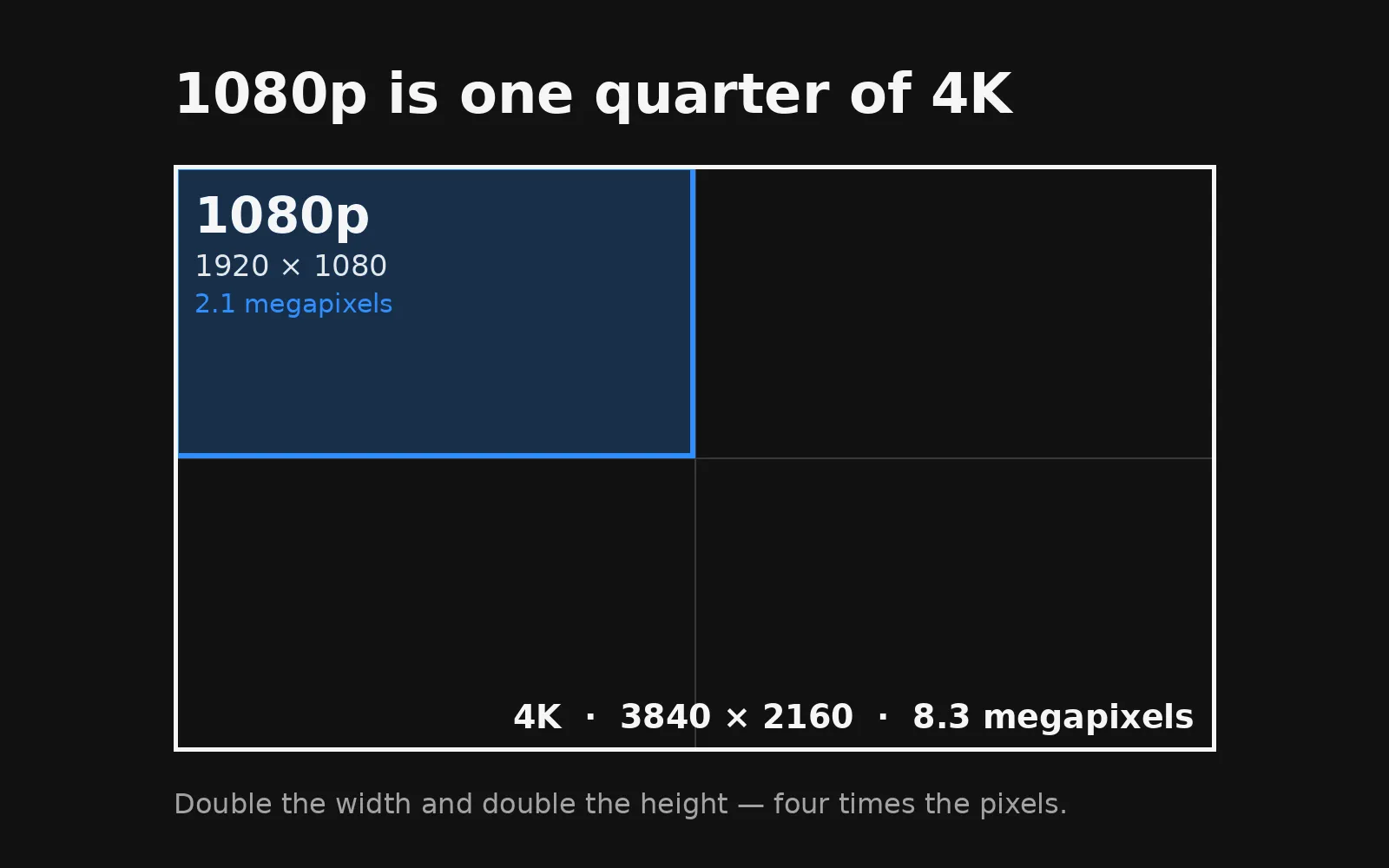
Then run that 4K clip at 60 frames a second instead of 30 and you’ve doubled it again — eight times the work of a 1080p clip at 30, for something that mostly sits behind your icons.
The file follows the same curve. The same footage at 4K is several times the size on disk, which matters just as much on a phone that shipped with 32 GB.
What to pick
Short video loops. A ten to twenty second clip at 1080p is the safest thing you can put on an older phone, and setting one takes about fifteen seconds. It’s a format the hardware has a dedicated decoder for, which is exactly why it’s cheap.
Rive animations. Wallpaper Reactor runs these as wallpapers, and they’re vector animations rather than video — they’re drawn from shapes instead of stored as pixels. Files are usually under a megabyte, they stay sharp at any screen size, and they’re inexpensive to draw. On a phone that’s tight on both storage and power, they’re often the best of both.
Go carefully with heavy shaders and 4K video. Not never — just not the first thing to try. A shader that does a lot of maths for every pixel is the one category where an older GPU will genuinely feel it.
Turn the cost down
You don’t have to guess at any of this. Wallpaper Reactor’s performance modes set the frame rate and how much of your screen’s resolution a wallpaper actually renders at:
| Mode | Frame rate | Resolution |
|---|---|---|
| Battery Saver | 15 fps | 50% |
| Balanced | 30 fps | 75% |
| High FPS | native | 75% |
| High Resolution | 30 fps | 100% |
| High Quality | 60 fps | 90% |
| Max Quality | native | 100% |
Battery Saver asks for roughly an eighth of the work Max Quality does. On a phone that’s showing its age, that’s the difference between a wallpaper you keep and one you turn off after a day.
Balanced is the sensible middle, and honestly most people can’t tell 30 from 60 on a wallpaper they aren’t staring at.
What Wallpaper Reactor does on its own
Two things happen without you setting anything up.
Wallpaper Reactor pauses when your phone enters battery saver — it watches for the system switching that on, and stops drawing rather than competing with the thing trying to save your battery. And it has a separate control for whether wallpapers run on battery at all, if you’d rather they only animate while charging.
Both are on by default, so the sensible behaviour is what you get out of the box.
An old phone is a fine place for this
There’s a decent argument that a hand-me-down phone is a better candidate for a live wallpaper than a new one — it’s the device most likely to be sitting on a desk being looked at rather than carried around.
It’s free, it runs on Android 9 and up, and when you do upgrade, the same library comes with you. The one place Android still gets in the way is plugging into a monitor.
Will a live wallpaper slow my phone down?▾
It depends on what you pick and which performance mode you use. A short 1080p video loop or a Rive animation on Balanced or Battery Saver is light work for most phones. A 4K clip at full frame rate is not.
How old can my phone be?▾
Wallpaper Reactor supports Android 9 and up, which means phones from 2018 onwards.
Does it drain my battery in the background?▾
No. Wallpaper Reactor only draws a wallpaper while it's on screen, and by default it pauses entirely when your phone switches into battery saver.
Does it use mobile data?▾
Only when you download a wallpaper. Once it is on your phone it plays locally, with no connection needed.
Free on Android 9 and up, and on Windows and macOS too.
 Download Wallpaper Reactor